Switching iPhone Data Mode at the airport
Why you got a notification
Home Assistant sends this prompt when your phone enters the Melbourne Airport zone. It's a reminder, not an automation — iOS doesn't expose Data Mode to Shortcuts or to any API, so the change has to be made by hand. It takes about fifteen seconds.
When to change it
| Situation | Choose |
|---|---|
| Flying out, roaming, or on a capped travel eSIM | Low Data Mode |
| Home again, back on the normal Telstra plan | Allow More Data on 5G |
Low Data Mode pauses background app refresh, automatic downloads, iCloud backups and photo sync, and drops video and FaceTime quality. Nothing breaks — things just wait until you're on Wi-Fi.
Steps
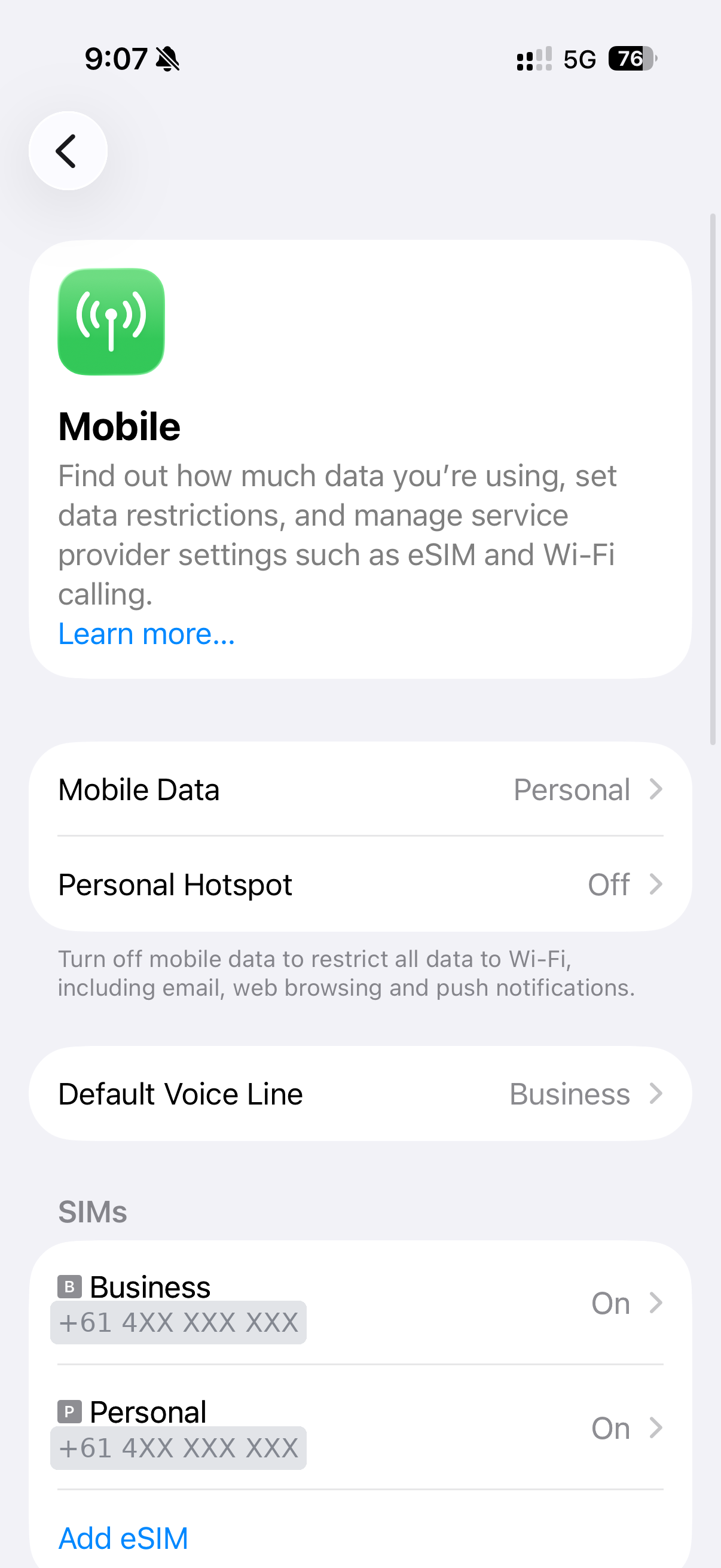
1. Open Settings → Mobile
Each SIM is listed separately at the bottom. Data Mode is a per-line setting, so change it on whichever line will actually be carrying data.
2. Tap the line you want to change
Tap Personal (or Business, or a travel eSIM if one is installed). Check the
Mobile Data row on the previous screen first — that tells you which line is
currently the data line.
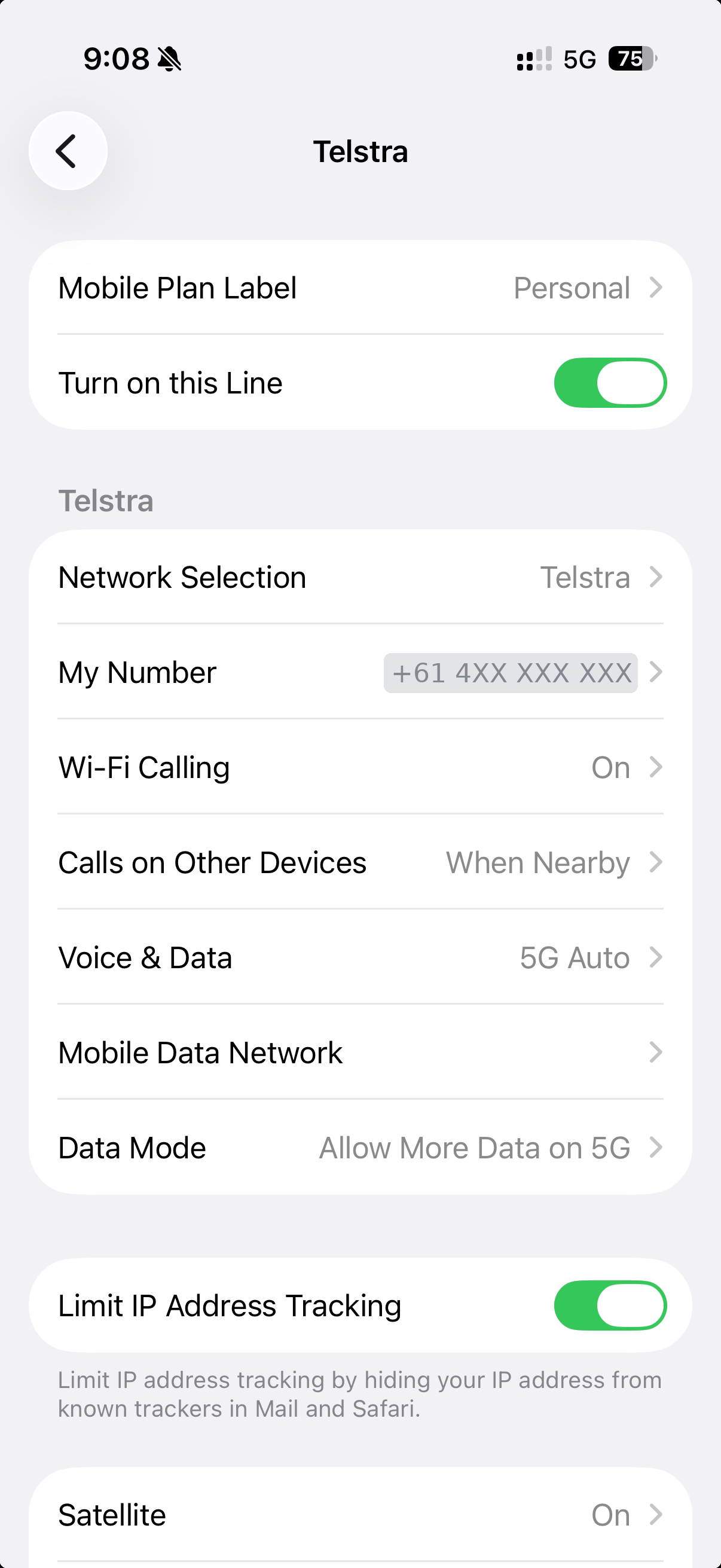
3. Scroll to Data Mode
It sits under the carrier heading, below Mobile Data Network.
4. Pick the mode
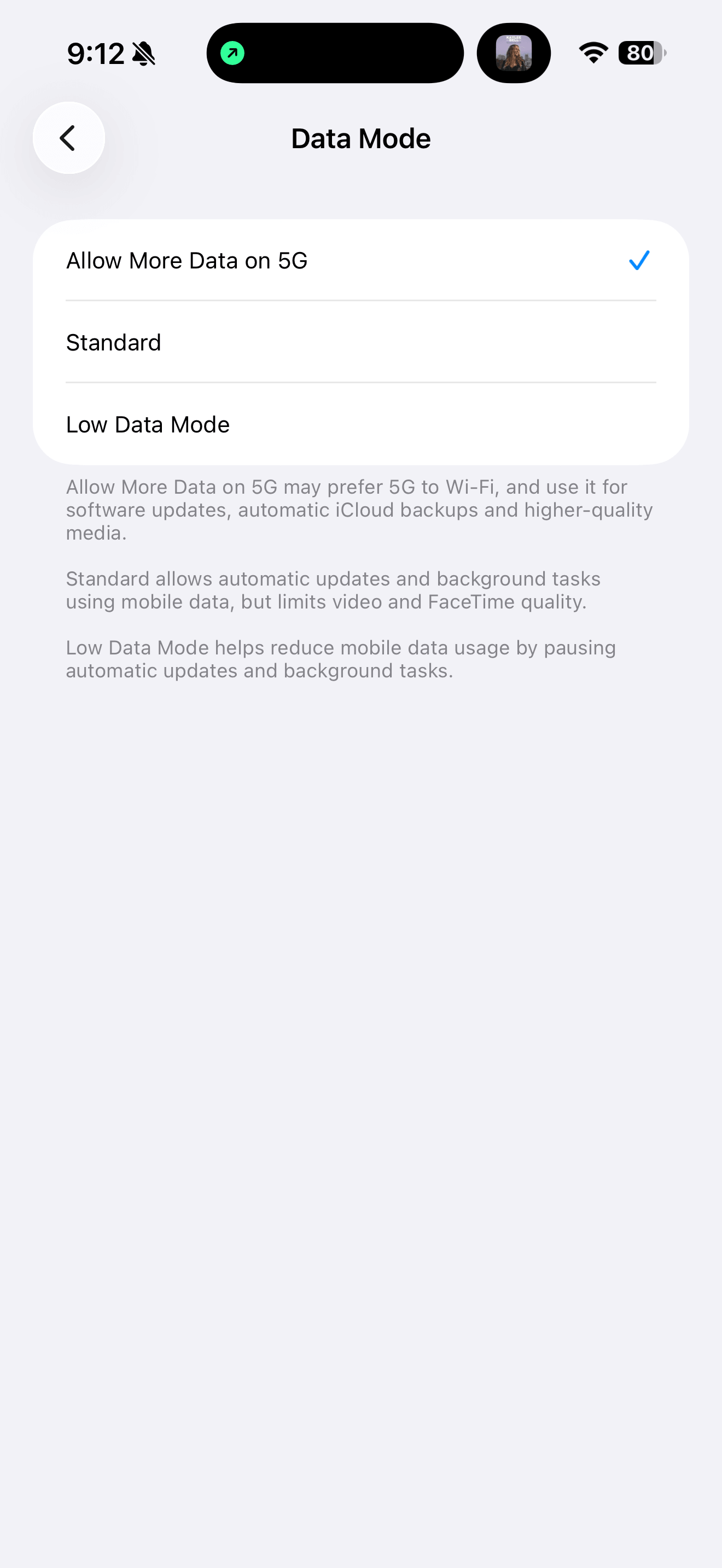
- Allow More Data on 5G — the normal setting at home. Prefers 5G over Wi-Fi in some cases, allows full-quality media and background updates over mobile.
- Standard — background tasks and updates allowed, video and FaceTime quality limited.
- Low Data Mode — background tasks and automatic updates paused.
Back out of Settings. It applies immediately; no restart needed.
Changing it back
The same path in reverse. Home Assistant sends a second prompt when you leave the airport zone on the way home, so you shouldn't have to remember.
Related settings worth knowing
- Wi-Fi Low Data Mode is separate and set per network: Settings → Wi-Fi → ⓘ next to the network. Useful for hotel and airport Wi-Fi without touching the home network.
- Data Roaming is per line, under the same screen as Data Mode. Turn it off on the Telstra lines before departure if a travel eSIM is doing the work.
- Default Voice Line and Mobile Data (the line selector) are on the main Mobile screen and are the two most likely things to be wrong after landing.
The automation behind the prompt
Lives in Home Assistant as travel_mel_airport_data_mode. Zone zone.melbourne_airport
is defined in the HA UI.
alias: Travel – Melbourne Airport data mode prompt
id: travel_mel_airport_data_mode
mode: single
triggers:
  - trigger: zone
    entity_id: person.andrew
    zone: zone.melbourne_airport
    event: enter
    id: arrive
  - trigger: zone
    entity_id: person.andrew
    zone: zone.melbourne_airport
    event: leave
    id: depart
actions:
  - choose:
      - conditions:
          - condition: trigger
            id: arrive
        sequence:
          - action: notify.mobile_app_andrews_iphone
            data:
              title: Melbourne Airport
              message: Switch Data Mode to Low Data Mode before you fly?
              data:
                push:
                  interruption-level: time-sensitive
                actions:
                  - action: URI
                    title: Show me how
                    uri: https://blindcreek.andrewgould.com.au/travel/melbourne-airport-data-mode/
      - conditions:
          - condition: trigger
            id: depart
        sequence:
          - action: notify.mobile_app_andrews_iphone
            data:
              title: Home run
              message: Put Data Mode back to Allow More Data on 5G?
              data:
                actions:
                  - action: URI
                    title: Show me how
                    uri: https://blindcreek.andrewgould.com.au/travel/melbourne-airport-data-mode/
Zone size matters
Melbourne Airport's zone radius needs to be large enough to catch the terminal precincts and the long-term car parks but small enough not to trigger on the Tullamarine Freeway. Around 1500 m centred on the terminal loop is a reasonable starting point; check that a drive to Sunbury via the freeway doesn't clip it.